
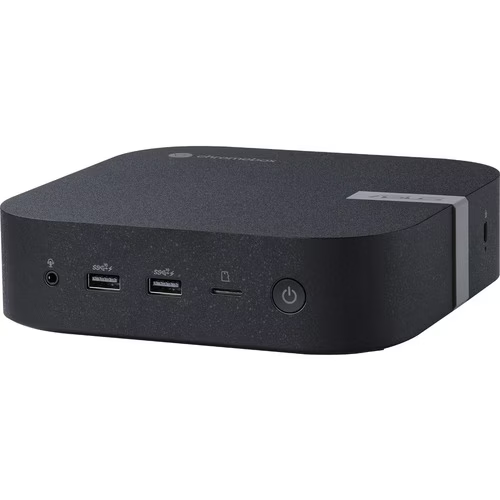
In today’s fast-paced digital world, the need for a versatile and connected workspace is more crucial than ever. Whether you’re a business professional, a student, or a creative individual, having the right tools can significantly impact your productivity and efficiency. Enter the ASUS Chromebox, a compact and powerful device that aims to provide a streamlined computing experience. But does it truly live up to the promise of being the ideal solution for the modern workspace? Let’s dive in.
What is an ASUS Chromebox?
An ASUS Chromebox is a small form-factor desktop computer that runs on Google’s Chrome OS. Unlike traditional desktops that use Windows or macOS, the Chromebox relies heavily on web-based applications and cloud storage. This unique approach offers several advantages, including:
- Simplicity: Chrome OS is known for its user-friendly interface and intuitive operation. Its clean design and straightforward functionality make it easy to learn and use, reducing the learning curve for new users.
- Speed: Chromeboxes generally boot up quickly and provide a snappy performance for most everyday tasks. This is due to Chrome OS’s lightweight nature and optimization for web applications.
- Security: Chrome OS has built-in security features, including automatic updates and sandboxing, which help protect against malware and other threats. Google regularly updates Chrome OS to patch vulnerabilities, and each app runs in its own isolated environment, minimizing the risk of infections.
- Affordability: Compared to traditional desktops, Chromeboxes are often more budget-friendly. This makes them an attractive option for individuals and organizations looking to minimize hardware costs.
Why Choose an ASUS Chromebox?
ASUS is a well-respected brand in the computer hardware industry, and their Chromebox offerings come with several distinct advantages:
- Reliability and Performance: ASUS Chromeboxes are known for their reliable performance, delivering smooth and efficient computing for everyday tasks. They are built with quality components to ensure long-term stability.
- Compact Design: ASUS Chromeboxes are designed to be compact and space-saving, making them ideal for modern workspaces where desk space is often limited. Their small footprint allows for flexible placement options.
- Robust Connectivity: ASUS Chromeboxes offer a wide range of connectivity options, including multiple USB ports, HDMI, and DisplayPort, allowing you to easily connect to peripherals and external displays.
- Easy Management: For businesses and organizations, ASUS Chromeboxes offer easy management through the Google Admin console, simplifying IT administration and reducing management overhead.
- Innovation: ASUS is known for its innovative designs, and their Chromeboxes often include features that set them apart, such as support for multiple displays and wireless charging capabilities.
Versatility for the Modern Workspace
The ASUS Chromebox’s compact size and Chrome OS’s versatility make it a compelling option for various modern workspace scenarios:
- Business and Productivity: Chromeboxes are ideal for office tasks such as email, document editing, and video conferencing. They can help businesses save on hardware costs and simplify IT management. For example, in a call center environment, Chromeboxes can provide a reliable and cost-effective solution for agents to access customer information and communication tools.
- Education: In schools and universities, Chromeboxes offer a secure and easy-to-manage computing solution for students and teachers. They can be easily deployed in classrooms and computer labs, and their cloud-based nature allows students to access their work from any device.
- Home Office: For those who work remotely, the Chromebox provides a clutter-free and efficient way to stay connected and productive. Its small footprint saves valuable desk space, and its quiet operation minimizes distractions.
- Digital Signage and Kiosks: The Chromebox’s reliability and remote management capabilities make it suitable for powering digital displays and interactive kiosks. They can deliver dynamic content, interactive experiences, and essential information in various public settings.
Connectivity: Staying Linked in a Connected World
In today’s interconnected world, seamless connectivity is essential. The ASUS Chromebox offers a range of ports and wireless options to ensure you can easily connect to your peripherals and networks:
- Multiple USB Ports: For connecting keyboards, mice, external drives, and other devices. This allows for flexible expansion and customization of the workspace.
- HDMI and DisplayPort: For connecting to monitors and displays. Supporting multiple displays can significantly enhance productivity by providing more screen real estate.
- Ethernet Port: For stable wired network connections. This is crucial for applications that require a reliable and high-speed connection, such as video conferencing and online collaboration.
- Wi-Fi and Bluetooth: For wireless connectivity to networks and devices. This enables users to connect to wireless networks, headphones, and other peripherals without the need for cables.
Management and Security
Beyond its basic functionality, the ASUS Chromebox offers robust management and security features, making it a strong contender for business and educational environments:
- Centralized Management: Chrome OS devices can be easily managed through the Google Admin console, allowing IT administrators to configure settings, deploy apps, and enforce policies remotely.
- Automatic Updates: Chrome OS automatically updates in the background, ensuring that the system is always running the latest version and has the latest security patches.
- Sandboxing: Each app and web page runs in its own isolated “sandbox,” preventing malware from affecting the rest of the system.
- Verified Boot: This feature ensures that the operating system hasn’t been tampered with and that the device boots up securely.
What Users Say: A Quick Review Roundup
To give you a balanced perspective, here’s what users and reviewers are saying about ASUS Chromebox devices:
- Positive Points:
- Compact and Space-Saving: Many users appreciate the small form factor, which helps to declutter workspaces.
- Fast and Efficient: The quick boot-up times and smooth performance for everyday tasks are frequently cited as advantages.
- Easy to Use: The simplicity of Chrome OS is a major plus for those who want a hassle-free computing experience.
- Good Value: Reviewers often highlight the affordability of Chromeboxes compared to traditional desktops.
- Versatile Connectivity: The inclusion of multiple ports, including HDMI and DisplayPort, is seen as a benefit for connecting to various peripherals and displays.
- Points to Consider:
- Limited Offline Functionality: While Chrome OS has improved, some users may find the reliance on web-based applications limiting, especially when offline.
- Storage Constraints: Chromeboxes typically come with smaller storage capacities, which may require users to rely more on cloud storage.
- Performance Limitations: For demanding tasks like advanced video editing or gaming, Chromeboxes may not be as powerful as traditional desktops.
- Dependency on Google Ecosystem: Users are heavily reliant on Google services and the Chrome OS ecosystem.
Is the ASUS Chromebox the Right Choice for You?
The ASUS Chromebox offers a compelling combination of versatility, connectivity, affordability, and robust management and security features, making it a strong contender for the modern workspace. However, it’s essential to consider your specific needs and requirements.
If you rely heavily on specialized software that is not available on the web, such as advanced video editing suites or CAD software, a traditional desktop might be a better option. But if you primarily use web-based applications and value simplicity, speed, security, and ease of management, the ASUS Chromebox is definitely worth considering.
Ultimately, the decision depends on your individual workflow and preferences. But for those seeking a streamlined, efficient, secure, and cost-effective computing solution, the ASUS Chromebox offers a compelling vision for the future of work.

